
Secure WhatsApp Web with Password Protection
Overview
The software is designed to enhance the security of WhatsApp Web by introducing a mandatory password requirement for access. It addresses the growing concern of unauthorized access to web-based messaging platforms, especially when users leave their devices unattended. The solution is particularly relevant for individuals who frequently use WhatsApp Web across multiple devices or public computers. By requiring a password before any session can be accessed, the tool adds a critical layer of protection to sensitive conversations and personal data.
Target users include privacy-conscious individuals, remote workers, and anyone who uses WhatsApp Web in shared or public environments. The software operates as a browser extension, integrating directly into the user’s web browser to monitor and control access to the WhatsApp Web interface. It does not alter the core functionality of WhatsApp Web but instead adds a security gate between the user and the service.
The developer, SecureWeb Tools, positions this product as a lightweight utility focused on privacy and data protection. Real-world use cases include securing access on office computers, shared family devices, or any scenario where physical access to a device is not fully controlled. The tool ensures that even if someone gains access to the browser session, they cannot view or interact with WhatsApp Web without the correct password.
Key Features & Capabilities
- Password-Protected Access – Every time a user attempts to open WhatsApp Web, the software prompts for a password. Without the correct credentials, the interface remains inaccessible.
- AES Encryption – The software uses AES encryption to secure the password and session data, ensuring that stored credentials are protected from unauthorized extraction.
- Session Locking Mechanism – Once activated, the tool locks the WhatsApp Web session until the password is entered, preventing any interaction until authentication is completed.
- Browser Extension Integration – Designed to work seamlessly within major web browsers, enabling easy installation and automatic activation on supported platforms.
- Reset Protection – If the password is forgotten or incorrectly entered multiple times, the only way to regain access is by resetting browser data, which ensures no backdoor exists.
These features are especially useful in environments where users share devices or use public terminals. For example, a professional using WhatsApp Web on a shared office computer can prevent coworkers from viewing their messages by enabling the password lock. Similarly, a family member using a shared laptop can protect personal conversations from being accessed by others. The tool’s reliance on standard browser infrastructure ensures broad compatibility and minimal setup effort.
User Interface, Workflow & Performance
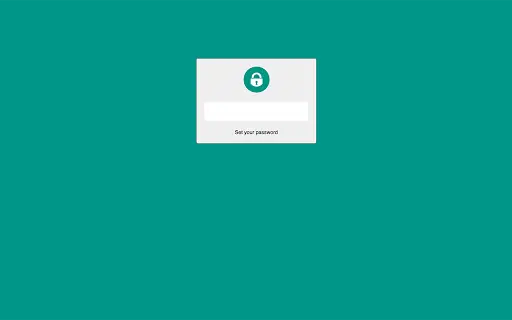
The user interface is minimal and designed for efficiency. The software operates primarily through a browser extension icon, which displays the current lock status. When a user attempts to access WhatsApp Web, a modal dialog appears, prompting for the password. The interface is straightforward, with no unnecessary elements or distractions.
Navigating through the tool’s settings is simple, typically involving a small menu accessible from the extension’s icon. Users can set or change the password, enable or disable the lock, and view basic status indicators. The workflow is linear: install the extension, configure the password, and begin using WhatsApp Web with enforced access control.
The developer did not specify resource usage details. Performance observations are based on general software behavior patterns. The tool is expected to have minimal impact on system performance due to its lightweight design and focus on session-level security rather than continuous background processes. Stability is assumed to be consistent with typical browser extensions, though no specific error reports or crash data were provided.
Compatibility & System Requirements
The software is compatible with Windows, Mac, and Linux operating systems. It functions as a browser extension, meaning it requires a modern web browser to operate. The installation size is 1.2 MB, indicating a lightweight footprint that should not significantly affect disk space or system performance.
Exact system requirements were not listed. The developer did not provide additional system requirements. Compatibility information is limited to the operating systems mentioned. Users should ensure their browser is up to date to maintain optimal functionality. The tool does not require administrative privileges for installation, which simplifies deployment across personal and shared devices.
Pros and Cons
Pros
- Provides strong password protection for WhatsApp Web sessions
- Uses AES encryption for secure password handling
- Simple and intuitive interface with minimal setup
- Lightweight at just 1.2 MB
- Free to use with no hidden costs
Cons
- Requires browser extension installation for functionality
- Forgotten password leads to complete session reset via browser data
- No support for multi-user profiles or password recovery options
- Dependent on browser compatibility and updates
- Performance and resource usage details not publicly disclosed
FAQ Section
Is this software compatible with all web browsers?
The software is designed to work with major web browsers, but specific compatibility details were not provided by the developer. Users should ensure their browser is up to date to maintain functionality.
Is the software safe to use?
Yes, the software uses AES encryption to secure the password and session data. It does not collect or transmit user data, and all processing occurs locally within the browser.
How do I update the software?
Updates are typically delivered automatically through the browser’s extension store. Users should ensure their browser is set to auto-update extensions to receive the latest version.
Can I use this tool offline?
Yes, the software functions entirely offline once installed. No internet connection is required to access or authenticate WhatsApp Web sessions.
What happens if I forget my password?
If the password is forgotten, the only way to regain access is by resetting the browser data. This ensures security but means all stored data in the browser will be lost.
Final Thoughts + CTA
This tool offers a straightforward and effective solution for securing WhatsApp Web sessions with password protection. Its use of AES encryption and simple workflow make it a reliable choice for users who prioritize privacy. While it lacks advanced features like password recovery or multi-user support, its minimal design and free availability make it highly accessible.
It is ideal for individuals who use WhatsApp Web on shared or public devices and want to prevent unauthorized access. The lightweight nature and cross-platform support further enhance its appeal. For users seeking a no-frills, secure way to lock their WhatsApp Web, this software delivers on its core promise.
Download Lock Your WhatsApp Web now







